Managed IT Services vs In-House IT: Which Is Better for Your Business?
Managed IT Services vs In-House IT: Which Is Better for Your Business?
 Naka Team
Every growing business reaches the same point: the person who “handles IT” can’t keep up anymore. Tickets pile up, security feels like guesswork, and one outage could cost days of productivity. That’s when leaders face the real question: managed IT services vs in-house IT. Which one is right for your business?
No answer fits every company. It depends on your size, budget, compliance requirements, and how central technology is to your operations. In this guide, the IT experts at NAKA compare both models on cost, expertise, security, scalability, and control, and give you a simple framework for deciding.
What Is In-House IT?
In-house IT means hiring your own employees to manage your technology. That could be a single IT generalist or a full department with help desk technicians, system administrators, network engineers, and a security lead. They’re on your payroll and focus only on your organization.
What Are Managed IT Services?
Managed IT services means partnering with a managed service provider (MSP) that takes responsibility for some or all of your IT for a predictable monthly fee. A provider like NAKA typically handles help desk support, 24/7 monitoring, patch management, cybersecurity, backup and disaster recovery, cloud management, networking, and long-term technology planning. You get a full IT team without building one.
There’s also a middle path, co-managed IT, where an MSP works alongside your existing internal team. More on that below.
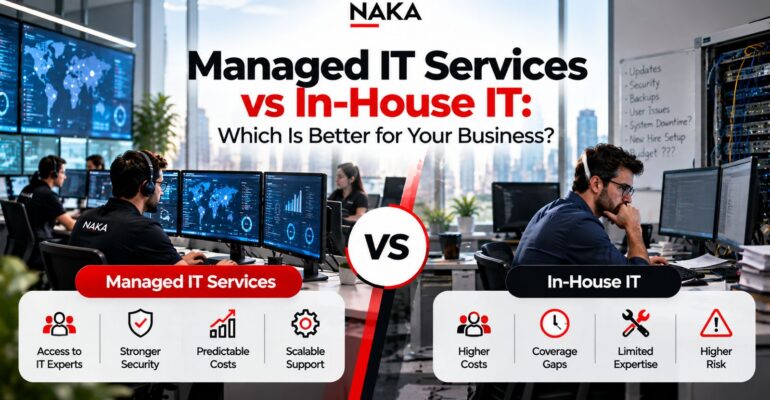
Managed IT Services vs In-House IT: How They Compare
Cost structure. In-house IT comes with salaries, benefits, training, tools, and the cost of turnover. Managed IT services replace those with a predictable monthly fee, usually priced per user.
Expertise. An in-house team is limited to the skills of the people you hire. A managed provider gives you access to a full bench of specialists in networking, cloud, cybersecurity, and infrastructure.
Availability. Internal staff typically work business hours, leaving gaps during nights, weekends, vacations, and sick days. Managed IT providers offer 24/7/365 monitoring and support.
Security. In-house security depends on your team’s skills and your budget for tools. Managed providers bring enterprise-grade security tools and dedicated security experts.
Scalability. Growing an in-house team means recruiting and onboarding, which takes time. With managed IT, you can scale users and services up or down as your business changes.
On-site presence. In-house staff can walk over and fix a problem right away. Managed IT is remote-first, with on-site support available when needed.
Business knowledge. Internal IT staff know your culture, people, and workflows from day one. A managed provider builds that knowledge over time through documentation and an ongoing partnership.
Control. In-house IT gives you full, direct control over priorities. With managed IT, control is shared and governed by clear SLAs and regular reporting.
The Real Cost: Managed IT Services vs In-House IT
For most businesses, cost is the deciding factor, so here are real numbers.
What in-house IT really costs
Salary is only the starting point. The average IT support specialist in the US earns about $71,425 per year, and senior roles cost more: a systems administrator earns a median of around $96,800 a year before benefits. In high-cost markets like New York City and Long Island, expect to pay above those national averages.
Then add:
- Benefits, payroll taxes, and paid time off (often 25–40% on top of salary)
- Ongoing training and certifications
- Software licenses, monitoring platforms, and security tools
- Recruiting costs and the productivity lost when an IT employee leaves
Put together, one in-house IT employee can cost $85,000–$120,000 a year fully loaded. And that buys you one person with one skill set, who can’t be on call 24/7.
What managed IT services cost
Most MSPs price per user per month. Standard managed IT support generally runs $100 to $250 per user each month in 2026, while comprehensive packages with advanced cybersecurity and compliance run $200 to $400 per user. Your pricing depends on the services included, your security and compliance requirements, and how complex your environment is.
A quick example
Consider a 30-person company:
- Managed IT at $150/user/month: $4,500/month, or about $54,000/year, for a team of specialists, proactive monitoring, and security tools.
- One in-house IT hire: roughly $85,000–$120,000/year, before tools, and with no backup when that person is out.
For small and mid-sized businesses, managed IT is often the cheaper option and covers more ground. Once a company passes roughly 100 employees, the math starts to change depending on how complex its environment is. That’s where co-managed IT often becomes the smartest option.
Pros and Cons of In-House IT
Advantages
- Deep business knowledge. Your team knows your people, processes, and systems.
- Immediate on-site presence. Someone can walk over and fix a problem.
- Full control over priorities and projects.
- Cultural alignment with your organization’s goals.
Disadvantages
- High, fixed costs that grow with every hire.
- Skill gaps. One or two people can’t be experts in networking, cloud, cybersecurity, compliance, and help desk all at once.
- Coverage gaps during nights, weekends, vacations, and turnover.
- Key-person risk. When your IT person leaves, critical knowledge leaves too.
- Slow to scale when you grow or add locations.
Pros and Cons of Managed IT Services
Advantages
- Predictable budgeting. A flat monthly fee replaces surprise repair bills.
- Broad expertise. You get specialists in security, cloud, networking, and infrastructure.
- Proactive support. Monitoring and patching stop issues before they cause downtime.
- Stronger cybersecurity through tools and processes most small businesses can’t afford alone.
- Easy scalability as you add employees, offices, or new technology.
- No hiring headaches. No recruiting, training, or turnover to manage.
Disadvantages
- Less on-site presence unless your agreement includes it.
- An onboarding period while the provider learns your environment.
- Provider quality varies. Choosing the wrong MSP can create more problems than it solves.
- Less direct day-to-day control, which strong SLAs and reporting help offset.
Security and Compliance: Often the Deciding Factor
Cyber threats have outgrown what one or two IT generalists can handle. Ransomware, phishing, and regulatory requirements in healthcare, financial services, education, and the public sector require layered defenses: endpoint detection and response, network and cloud security, backup and disaster recovery, multi-factor authentication, and ongoing security oversight.
Building that in-house means hiring hard-to-find security talent and buying enterprise tools. A managed provider spreads that cost across many clients, so a 25-person business can get protection that would otherwise be out of reach. NAKA’s Security Services and CISO as a Service give businesses executive-level security leadership without the cost of a full-time security executive.
When In-House IT Makes More Sense
In-house IT may be the better fit if:
- You have hundreds of employees and enough IT workload to justify a full team.
- Technology is your core product, and you build proprietary systems.
- You rely on specialized, on-premises systems that need constant hands-on attention.
- You need daily on-site support across a large physical footprint.
Even then, many large organizations use an MSP to fill specific gaps, like after-hours monitoring or cybersecurity. And if you do decide to build internally, NAKA’s Staffing Services can help you find the right IT talent.
When Managed IT Services Make More Sense
Managed IT services are usually the smarter choice if:
- You have roughly 10–150 employees and can’t justify a full IT department.
- You need 24/7 monitoring and support but can’t staff it.
- You want predictable monthly IT costs.
- Cybersecurity or compliance is a growing concern.
- Your IT person is overwhelmed, or your business depends on a single “IT hero.”
- You’re growing fast and need IT that scales with you.
The Best of Both Worlds: Co-Managed IT
This doesn’t have to be all-or-nothing. With co-managed IT, your internal team keeps ownership of strategy and user relationships, while a partner like NAKA handles the heavy lifting: after-hours monitoring, cybersecurity, patching, backups, network management, or overflow help desk tickets.
Co-managed IT works especially well for mid-sized organizations that already have an IT manager or director but need more depth, coverage, or specialized skills without adding headcount.
How to Decide: A 5-Question Framework
Ask yourself:
- What does IT really cost us today? Include salaries, benefits, tools, downtime, and lost productivity.
- What happens if our IT person is unavailable for two weeks? If that makes you nervous, you have key-person risk.
- How confident are we in our cybersecurity? Could we pass an audit or recover quickly from ransomware?
- Do we need support outside business hours?
- Where should our internal talent focus, on keeping the lights on or on projects that grow the business?
If most of your answers point to cost pressure, coverage gaps, or security concerns, managed IT services are likely the right move.
What to Look for in a Managed IT Provider
Before you sign with any MSP, look for:
- Clear SLAs with defined response and resolution times
- Transparent pricing that spells out what’s included and what’s billed separately
- A proactive security stack, including EDR, MFA, backups, email filtering, and security awareness training
- Industry experience relevant to your compliance needs
- Strategic guidance, such as regular technology reviews and roadmap planning
- Proven results, including references, case studies, and client testimonials
Why Businesses Choose NAKA for Managed IT Services
NAKA is a minority-owned IT solutions company headquartered in Central Islip, NY, focused on assessments, cybersecurity, managed services, strategic consulting, staffing, and cloud enablement. With offices in New York City, Chicago, Miami, Phoenix, Nashville, and beyond, NAKA supports businesses locally and across North America.
What sets NAKA apart:
- Scale and experience: 491 satisfied clients, 862 successful projects, and 245 skilled IT experts across 9 global locations.
- End-to-end capability: Managed Services, Cloud Services, cybersecurity, networking, SD-WAN, unified communications, and lifecycle management under one roof.
- Industry expertise in healthcare, financial services, education, manufacturing, retail, the public sector, nonprofits, and more.
- Recognized results: Named a Top Long Island Workplace in 2024, 2025, and 2026, and voted Best Cyber Security and Best Computer Services by Long Islanders in 2021.
Clients say it best. Long Island Cares CEO Paule Pachter describes NAKA as a managed services partner that functions as an extension of his team, praising its responsiveness, expertise, and proactive approach to keeping technology secure.
Want to see what fully managed IT looks like in practice? Read our guide: How Fully Managed IT Services Transform Your Business.
Final Verdict: Which Is Better for Your Business?
For most small and mid-sized businesses, managed IT services deliver more expertise, stronger security, and more predictable costs than building an in-house IT team. In-house IT still makes sense for larger organizations with complex, specialized needs, and co-managed IT gives growing companies a flexible middle option.
The right choice depends on your size, risk tolerance, and growth plans. The wrong choice is to keep patching things together until a breach or outage forces the decision for you.
Not sure which model fits your business?
Book a discovery call with NAKA’s IT experts. We’ll assess your current environment, compare the real costs of in-house vs managed IT, and recommend the approach that fits your goals.
Talk to a Consultant → Sales: 833.GET.NAKA | Email: cs@nakatech.com
Frequently Asked Questions
Is managed IT cheaper than in-house IT?
For most businesses under about 100 employees, yes. A managed IT agreement often costs less than one full-time IT employee and includes a team of specialists, 24/7 monitoring, and security tools.
Can a managed IT provider replace my internal IT team?
For many small businesses, yes. Larger organizations often choose co-managed IT, where NAKA works alongside internal staff to add coverage and expertise.
Will I lose control of my IT if I outsource?
Not with the right partner. NAKA provides documentation, reporting, and regular strategy reviews so you stay informed and in charge of key decisions.
How long does it take to switch to managed IT services?
Onboarding typically takes a few weeks, depending on your environment’s size and complexity. It includes discovery, documentation, a security assessment, and tool deployment.
Does NAKA serve businesses outside Long Island?
Yes. NAKA is headquartered in Central Islip, NY, with offices in New York City, Chicago, Miami, Phoenix, Nashville, Maryland, South Carolina, Wisconsin, and international locations.
What’s the difference between managed IT and break-fix IT?
Break-fix providers bill you only when something breaks. Managed IT providers like NAKA work proactively to prevent problems for a predictable monthly fee.