Managed IT Services vs Break-Fix IT: What’s the Difference?
Managed IT Services vs Break-Fix IT: What’s the Difference?
 Naka Team
Waiting for something to break is the most expensive IT strategy
Every business pays for IT support one way or another. The only question is whether you pay to prevent problems or pay to clean them up.
That is the real difference between managed IT services and break-fix IT. Break-fix waits for a server to crash, a laptop to freeze, or ransomware to lock your files, then bills you by the hour to fix it. Managed IT services monitor your systems around the clock and fix small issues before they become outages.
If you are comparing IT support options for your business, this guide lays out how each model works, what each really costs, and why more companies are moving to proactive, managed IT.
What is break-fix IT?
Break-fix IT is pay-as-you-go repair. When something stops working, you call a technician, they fix it, and you get an invoice for the hours and parts.
The model made sense when offices ran on a few desktops and a printer. Today most businesses run on cloud apps, remote devices, email, and connected networks. Treating that environment as a series of one-off repairs creates predictable problems:
- Downtime is built in. Nobody looks at your systems until they fail, so every issue is discovered by an employee who can no longer work.
- Costs are unpredictable. A quiet month costs little; a failed server or security incident can wipe out a quarter’s IT budget.
- Incentives are misaligned. A break-fix provider earns more when you have more problems. There is no financial reason for them to make your systems more stable.
- No one owns the big picture. Patching, backups, licensing, and security settings drift because nobody is responsible for them between calls.
- You get whoever is available. Each visit may bring a different technician who has to relearn your setup on your dime.
What are managed IT services?
Managed IT services are ongoing IT support delivered by a managed service provider (MSP) for a predictable monthly fee. Instead of waiting for your call, the provider takes responsibility for keeping your technology healthy, secure, and up to date.
A typical managed IT engagement works like this:
- Discovery. The provider documents your hardware, software, users, licenses, and network so nothing is a mystery.
- Monitoring agents. Lightweight software on servers, workstations, and network devices reports health and security data in real time.
- 24/7 monitoring. Alerts flag early warning signs such as a failing drive, a missed backup, or suspicious logins.
- Scheduled maintenance. Patches and updates are applied in planned windows, not in the middle of your workday.
- Help desk support. Employees get one point of contact for everyday issues, with response times set in a service level agreement (SLA).
- Reporting and planning. Regular reviews show what was fixed, what was prevented, and what to budget for next.
At NAKA, managed IT covers infrastructure management, network and security management, backup and disaster recovery (BDR), remote monitoring and management (RMM), server administration, mobile device management, managed cloud, and a full-service help desk.
Managed IT services vs break-fix IT at a glance
Here is how the two models compare on the factors that matter most to a business:
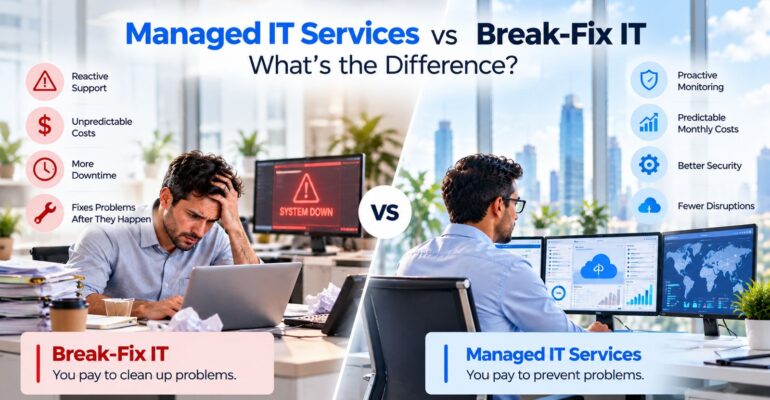
- Approach: Break-fix is reactive and fixes problems after they happen. Managed IT services are proactive and prevent failures before they disrupt your team.
- Pricing: Break-fix bills hourly rates plus parts for every incident. Managed IT services charge a fixed monthly fee, per user, per device, or by tier.
- Budget predictability: Break-fix costs spike with every problem. Managed IT turns support into a forecastable operating expense.
- Coverage: Break-fix works during business hours, whenever a technician is free. Managed IT includes 24/7 monitoring with SLA-backed response times.
- Security: Break-fix deals with security after an incident. Managed IT provides continuous patching, firewall management, antivirus, and threat monitoring.
- Backups: Under break-fix, backups often go unchecked until you need them. Managed IT monitors backups and tests restores regularly.
- Provider incentive: A break-fix provider earns more when things break. A managed provider earns more when things run smoothly.
- Knowledge of your systems: Break-fix technicians relearn your setup on each visit. A managed provider documents your environment and assigns a consistent team.
- Strategy: Break-fix focuses only on the current ticket. Managed IT adds roadmaps, lifecycle planning, and budget guidance.
- Scalability: With break-fix, every change is a new project. Managed IT scales with your headcount and locations by contract.
7 advantages of proactive IT with managed IT services
1. Less downtime, more productive hours
Most outages send warning signs first: a drive throwing errors, a server running out of space, a backup that quietly failed. With 24/7 remote monitoring, those signals trigger an alert and a fix, often before anyone in your office notices. Break-fix only learns about the problem when your team is already stuck.
2. Predictable IT costs
A flat monthly fee turns IT from a surprise expense into a line item you can plan around. You are not deciding whether a problem is “worth” a service call. One caution when comparing providers: ask exactly what triggers extra billing. A contract that monitors issues but bills hourly to fix them is just break-fix with a subscription.
3. Stronger cybersecurity
Many breaches exploit known vulnerabilities that were never patched. Managed IT services keep operating systems and applications updated on schedule and add layers such as firewall management, intrusion detection and prevention (IDS/IPS), antivirus, and security patch and hotfix management. NAKA pairs this with multi-layered security policies and continuous monitoring through its security services.
4. Backups you can actually restore
A backup is only useful if it works on the day you need it. Proactive IT monitors every backup job and tests restores, and a backup and disaster recovery (BDR) plan defines how fast you get back online after hardware failure, ransomware, or a site outage.
5. Compliance without the scramble
Healthcare, finance, education, and public-sector organizations face strict data rules. A managed provider with experience in regulated environments keeps systems aligned with those standards continuously, instead of rushing before an audit.
6. A team, not a single technician
You get a bench of certified engineers across networking, cloud, security, and help desk. Knowledge about your environment is documented, so it doesn’t walk out the door when one person leaves or goes on vacation.
7. Technology that supports growth
When the day-to-day is handled, conversations shift to strategy: infrastructure roadmaps, hardware lifecycle planning, cloud migration, and scaling for new hires or locations. Your IT stops being a cost center you tolerate and becomes a tool for growth.
Is break-fix ever the right choice?
Sometimes. Break-fix can be enough for a very small business with a handful of employees, no servers, no sensitive data, and no compliance requirements, where an outage is an inconvenience rather than a lost day of revenue.
For almost everyone else, the math changes quickly. If any of these sound familiar, managed IT services are likely the better investment:
- A few hours of downtime would cost you real revenue or customers
- You store customer, patient, or financial data
- You answer to regulations such as HIPAA or industry audits
- You are adding employees, devices, or locations
- Your internal IT person spends every day putting out fires
- Nobody can clearly say who is responsible for your backups and security
How to choose a managed IT services provider
Not every MSP delivers truly proactive IT. Use these questions when comparing proposals:
- What is included, and what costs extra? Get the line between covered work and billable work in writing.
- What are your SLA response times, and what happens if you miss them? Commitments without consequences are just promises.
- Do you monitor 24/7, and who responds to alerts after hours?
- Who will work on our account? Look for a consistent team that learns your environment.
- Have you supported businesses in our industry? Healthcare, finance, manufacturing, and public-sector IT each carry different requirements.
- How do you handle security and backups? Ask how often restores are tested and how threats are detected.
- What does onboarding look like? Basic monitoring can often go live within a couple of weeks, while full documentation and stabilization usually takes 60 to 90 days.
- What happens if we leave? You should keep ownership of your data, documentation, and licenses.
Why businesses choose NAKA for managed IT services
NAKA is a minority-owned IT solutions company headquartered in Central Islip, New York, with 20 years of experience managing IT infrastructure for commercial, federal, and educational organizations. The numbers behind the team:
- 491 satisfied clients
- 862 successful projects
- 245 skilled IT experts
- 9 global locations, including New York City, Chicago, Miami, Phoenix, and Nashville
What sets NAKA’s managed IT services apart:
- Certified engineers with hands-on experience in enterprise-grade infrastructure
- Deep experience in highly regulated industries, including healthcare, BFSI, education, and the public sector
- Expertise in cloud-native, hybrid, and complex IT environments
- Continuous compliance with data governance requirements
- 24/7 monitoring and fast remediation
- A single point of contact (SPOC) help desk for your whole team
NAKA has also been named a Top Long Island Workplace (2024, 2025, 2026), a Top Cybersecurity Services Provider (2023), and ranked #12 among IT management companies by Inc. with 1,445% growth (2022).
Clients notice the difference. Paule Pachter, CEO of Long Island Cares, credits NAKA’s proactive approach with keeping their technology secure and reliable so the organization can focus on growth.
Stop paying for problems. Start preventing them.
If your business is still waiting for things to break, it is time for a better model. Book a discovery call with NAKA’s IT experts to see what proactive managed IT services could look like for your organization.
Sales: 833.GET.NAKA · Support: 844.ASK.NAKA · Email: cs@nakatech.com
Frequently asked questions
What is the main difference between managed IT services and break-fix?
Break-fix is reactive: you pay by the hour after something fails. Managed IT services are proactive: you pay a fixed monthly fee for continuous monitoring, maintenance, security, and support that prevent failures in the first place.
Are managed IT services more expensive than break-fix?
The monthly fee can look higher than a quiet month of break-fix. Once you count emergency repair bills, lost productivity during outages, and the cost of a security incident, managed IT services usually cost less over a full year and are far easier to budget.
Can managed IT services work alongside my in-house IT team?
Yes. In a co-managed model, the provider handles monitoring, patching, security, and help desk while your internal staff focus on business applications and strategic projects.
How long are managed IT services contracts?
One to three years with monthly billing is common. Before signing, ask how onboarding works and what the exit process looks like.
Is proactive IT worth it for a small business?
It depends on how much your business relies on its systems, not just on headcount. If a day of downtime would cost you revenue or customers, proactive managed IT services usually pay for themselves.